![[Un]Churned by Gainsight](https://substackcdn.com/image/fetch/$s_!7AoO!,w_120,h_120,c_fill,f_webp,q_auto:good,fl_progressive:steep/https%3A%2F%2Fsubstack-post-media.s3.amazonaws.com%2Fpublic%2Fimages%2Ffe2167ac-0bcf-4575-9712-8d5ef3588851_300x300.png)
![[Un]Churned by Gainsight](https://substackcdn.com/image/fetch/$s_!hKlf!,e_trim:10:white/e_trim:10:transparent/h_72,c_limit,f_auto,q_auto:good,fl_progressive:steep/https%3A%2F%2Fsubstack-post-media.s3.amazonaws.com%2Fpublic%2Fimages%2Fe14b36dd-52b9-48a3-9f93-3f6a459d55ff_1344x256.png)
![[Un]Churned's avatar](https://substackcdn.com/image/fetch/$s_!vkJ0!,w_108,h_108,c_fill,f_webp,q_auto:good,fl_progressive:steep/https%3A%2F%2Fsubstack-post-media.s3.amazonaws.com%2Fpublic%2Fimages%2F0464ad30-26c2-4f32-b429-ae4283dd5586_200x200.png)

“You can’t hire any more people unless you can prove to me that AI can’t do the job first.”
That’s what Colin Slade’s CEO told him last year. Not as a suggestion. As the new operating reality.
Colin is the SVP of Customer Success at Cloudbeds, a hospitality management platform serving tens of thousands of properties across 150 countries. His mandate was clear: grow faster, improve retention, deliver a unified customer experience. His constraints were equally clear: zero hiring budget, zero tools budget, a team already at 120% capacity fresh off a reduction in force.
Oh, and one more thing: they’d already bought company-wide Gemini licenses through Google Enterprise. Nobody was using them well.
Most CS leaders would see this as an impossible situation, but Colin saw it as a forcing function.
Eight months later, his team has built over 150 AI agents and automations running in production. They’re serving 40-50% more customers with the same headcount. They’ve achieved 95% accuracy on company-wide knowledge queries, 75% deflection on support tickets, and avoided $4.5M in additional headcount costs. Colin’s work has been so impactful that he was recently promoted to head AI Strategy at Cloudbeds in addition to his SVP of Customer Success role.
His team has built the muscle memory for a truly agentic AI factory. What used to take them 2-3 months to build now takes one week. This isn’t a case study about having the perfect team, the perfect documentation, or the perfect budget. It’s about a leader who decided to stop piloting and start building.
Here’s exactly how he did it, and how you can start today.
The Problem Isn’t Unique to Colin
Maybe you’re facing something similar. Your company is growing faster than you can add headcount, and your team is drowning in administrative work that pulls them away from customers. CSMs are spending 70% of their time on tasks that don’t deepen relationships. The customer experience feels fragmented because no one has the bandwidth to connect the dots. Meanwhile, executives keep asking about your “AI strategy” while you’re just trying to keep your head above water.
Maybe you’ve tried. You invested in AI licenses that no one ended up using. You launched a pilot that stalled out. You joined webinars hoping for clarity but left with even more questions. Here’s what separates teams that succeed from those that stay stuck: the willingness to start messy and learn fast.
What shocks people the most about Colin’s story is the speed:
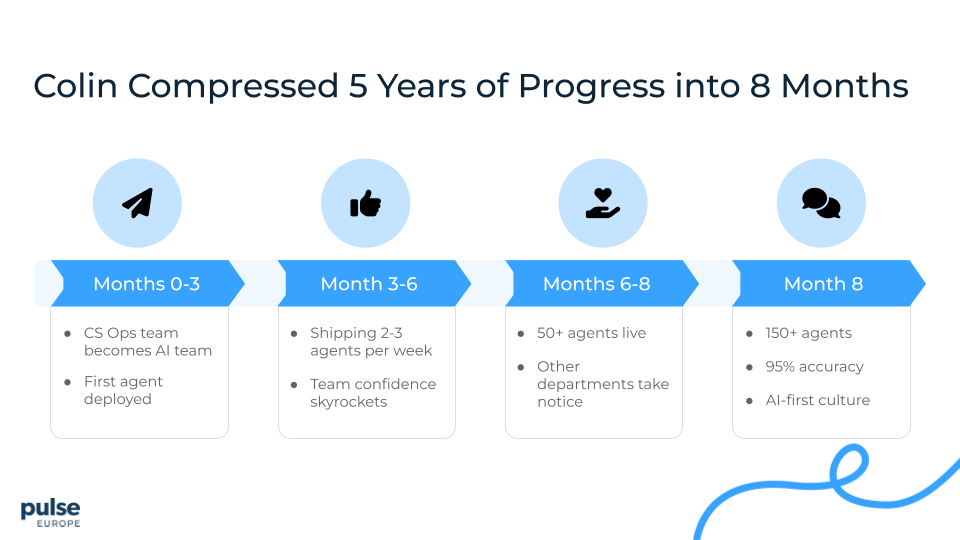
Months 0-3: Colin took his CS Operations team (people who’d never built AI before, who were doing manual reporting and QBRs) and said: “Stop all other CS Ops work. We’re going all-in on AI. You’re now the AI team.” They built and proved out their first agent.
Months 3-6: They were shipping 2-3 new agents every single week. The team was gaining confidence with every win.
Months 6-8: They had over 50 agents in production. Other departments started coming to them asking, “How did you do this? Can we use your playbook?”
By month 8: 150+ agents and automations running in production. 95% accuracy. AI wasn’t a project anymore. It was infrastructure.
Today: What used to take them 2-3 months to develop now takes one week. They’ve built the muscle memory.
Colin’s team didn’t start with technical expertise. They weren’t engineers or data scientists. They were CS Ops analysts who got curious and were willing to learn in the mess. That’s it. That’s the unlock.
The Three Roles You Actually Need
You’re probably thinking: “Great story, but I don’t have an AI team.” The good news is that you don’t need one, just a few people you already likely have.
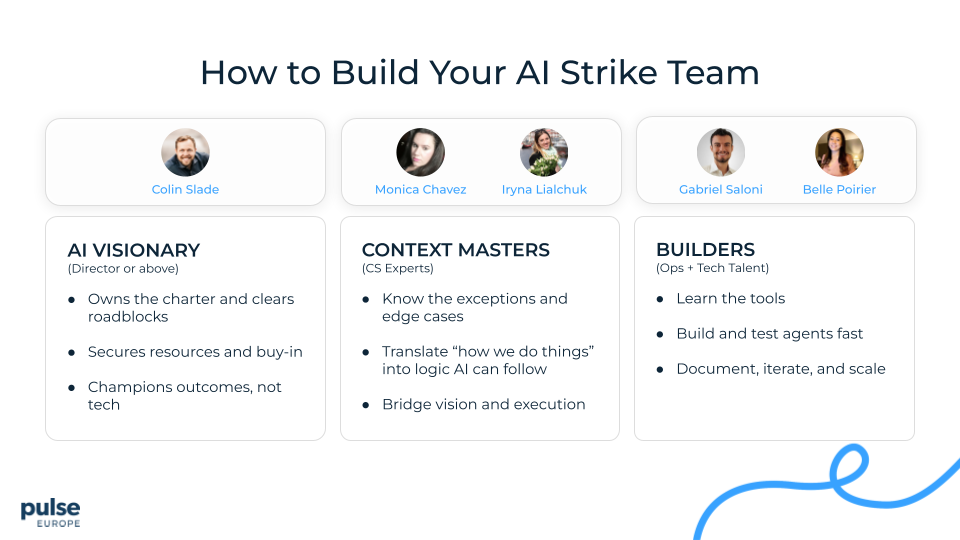
1. The Executive AI Visionary
This is the person who fights for resources in boardrooms, removes organizational blockers, and keeps momentum when things get hard. At Cloudbeds, this is Colin, but this doesn’t have to be you. It just needs to be someone with enough organizational capital to make things happen. If you’re stepping into this role yourself, Colin’s newsletter is one of the best places to learn what’s really working in AI for CX.
2. The Context Master (The OG)
This is one of your top CS performers who knows your processes inside and out. They understand edge cases, exceptions, and tribal knowledge—and can translate all of it into what an AI agent actually needs to do.
3. The AI Operator
This is the person who builds and maintains your agents. Often it’s someone from CS Ops who has lived inside the manual work you want to automate.
How Cloudbeds Combined These Roles
Cloudbeds didn’t hire separate people for each role. They leveled up the talent they already had:
Monica Chavez and Iryna Lialchuk brought their years of CS context and operational knowledge, and stepped directly into Operator responsibilities. They help to build and ship agents weekly.
Belle Poirier stepped up to lead the Operator function.
Gabriel Saloni became the technical AI Operator, turning business logic into high-quality agent builds.
Together, the four of them became a combined “context + operator” strike team, shipping meaningful AI-led workflows every single week.
What Problems Actually Get Solved
Colin and the Cloudbeds team have developed over 150 AI automations and workflows for their post-sales organization. You can download the entire list of them here. Let’s dig into three categories driving a big impact at Cloudbeds and handling real volume.
Category 1: Ticket Triage
They built Agent Skylar, a multi-agent system (which just means multiple AI agents working together) that handles incoming support tickets.
Here’s what happens when a ticket comes in:
Skylar checks if there are other tickets for this customer
Analyzes sentiment (happy, pissed, neutral)
Pulls additional customer data from Zendesk, Salesforce, and Jira
Determines if escalation is needed
Provides troubleshooting guides and KB links
Another agent (Athena) generates a draft response for the human to review
The human gives the system feedback and ships the response to the customer (Human-In-The-Loop technique)
Every ticket can be answered in half the time.
But here’s the critical lesson: they didn’t build all of that on day one. In fact, that was their original mistake. They tried to over-engineer everything at once, and it failed.
What actually worked was starting small. They began with simple sentiment analysis: three categories—happy, pissed, neutral. That’s it. They proved it worked. Then they added escalation logic. Then troubleshooting. Step by step.
Category 2: Knowledge Assistant (95% Accuracy in Under 1 Minute)
They built Ask Apollo, their company intelligence assistant that now gets 200-250 queries per day across the entire company.
It searches everything (Slack, Docs, Jira, Zendesk, Salesforce), reads images, and delivers 95% accurate answers in under a minute with sources. It cost them $100/month in tools plus $20k one-time consulting. With Ask Apollo, the CEO’s number one issue (productivity loss from searching for information) was eliminated.
Start Small, Solve Big
Don’t try to boil the ocean. Pick the lowest hanging fruit with the biggest impact, prove it works, then expand from there.
Cloudbeds built Ask Apollo as their knowledge assistant, but it became something more: a self-healing knowledge system. When Apollo can’t answer a question, it automatically creates a ticket in ClickUp for their training team. The AI checks old docs and suggests updates to help the training team create new content. Apollo then re-ingests everything twice a week, closing knowledge gaps automatically.
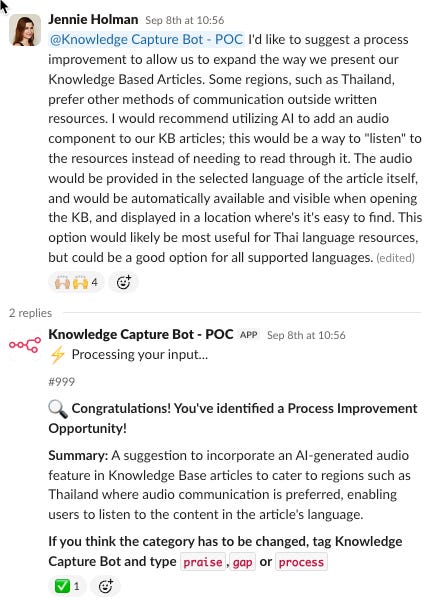
You build something to solve one specific problem, and you discover it solves three other problems you didn’t even know you had. Stay curious about the side benefits. The biggest ROI often comes from places you don’t expect.
The (Mostly Free) AI Tool Stack
Let’s talk about what this actually costs to build.
Colin’s team uses these tools to build their AI agents:
Google AI Studio (free if you’re a Google shop)
Claude/ChatGPT/Gemini for heavier coding work
Lovable for building prototypes
On the Large Language Model (LLM) side, they pay about $20-50 per user per month across ChatGPT, Gemini, and Claude along with API connection fees. Some models are better at certain tasks than others. Having all three is a luxury that we also benefit from at Gainsight, but my suspicion is that using all three falls into the category of Experimental Recurring Revenue (ERR) and that companies will soon converge on a single LLM choice.
Agentic
Their backbone for everything agentic is N8N, their orchestration layer where agents live and workflows connect. They cloud-host it for about $50 a month. There are alternatives like Lindy, CrewAI, and MindStudio, Zapier, but N8N gave them the flexibility they needed. I personally enjoy using Relay.app.
Knowledge System
For their knowledge system, they use Pinecone as a vector database. It costs $25 a month, though you can start for free. This is what powers Ask Apollo and gives them that 95% accuracy. But Pinecone won’t hit your vocabulary until you’ve been doing this for a while and are ready to level up into truly building your own knowledge base.
APIs
They also need API access to all their systems (Zendesk, Salesforce, Jira, etc.). Sometimes that requires an extra license, sometimes it’s included. They created shared credentials so their whole team can build using the same connections.
Analysis
For quick analysis work, they use NotebookLLM, which is completely free from Google. It ingests docs, videos, and workflows to help them move fast.
What Does This Actually Cost?
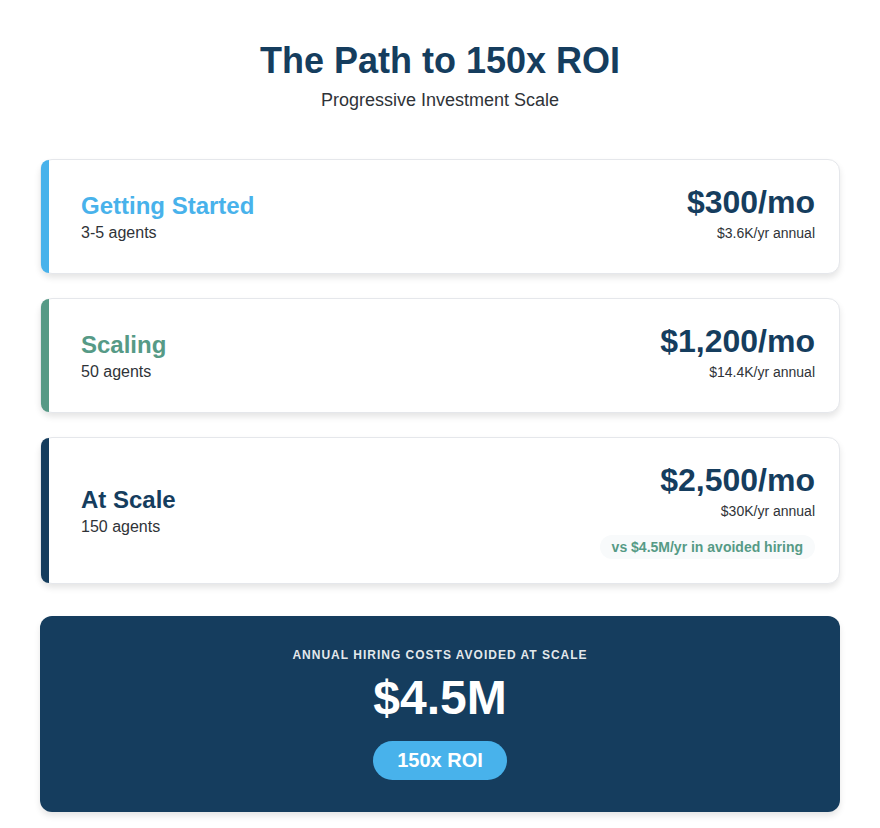
To get started with your first 3-5 agents, you’re looking at about $300 a month. As you scale to 150 agents like Colin did, you’re at about $2,500 a month in tools. Compare that to the $4.5M they’re saving annually by not adding more headcount. That’s an ROI of 150x at scale.
The expensive part isn’t the tools. It’s the time investment into learning. But once your team learns, they can build anything. And what took months now takes a week.
How to Build: Don’t Skip Steps
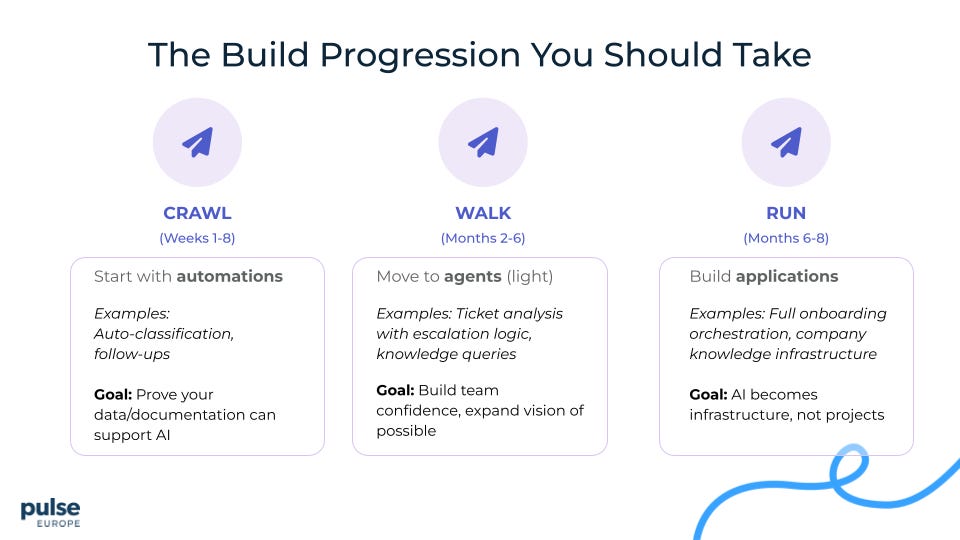
The framework that works: Crawl → Walk → Run. The biggest mistake people make is trying to skip straight to running.
CRAWL: Start with Automations (Weeks 1-8)
Start with simple automations. Linear workflows: if this happens, do this, then this, then this. Think auto-classification of tickets. Automated follow-ups after resolution. Very straightforward, very measurable.
The goal isn’t to change the world, it’s to prove that your data and documentation can actually support AI. If your data is a mess (and it will be) or your documentation doesn’t exist completely, you’re going to find out here before you waste months building something complex.
WALK: Move to Agents (Months 2-6)
Now you can move to actual agents that can reason and make decisions. This is your ticket analysis agent that looks at sentiment and decides whether to escalate. Like Cloudbeds’ Ask Apollo, your agent understands context and can answer nuanced questions.
The goal here is to build your team’s confidence and expand their vision of what’s possible. Once they see an agent work, their minds explode and they start imagining ten more use cases.
RUN: Build Applications (Months 6-8)
Now you’re building full applications with multiple agents and automations working together. Imagine your entire onboarding process, orchestrated by AI. This is your company-wide knowledge infrastructure.
At this stage, AI isn’t a project anymore. It’s just infrastructure. It’s how you work.
The Critical Part
Do not overengineer step one. I see teams try to build the full escalation engine with machine learning models and complex decision trees on day one. Don’t do that.
Colin’s team tried that. It failed.
What worked? Prove that sentiment analysis works first. Three categories: happy, pissed, neutral. That’s it. Get that to 90% accuracy and then add features. As you get reps in and build that muscle memory, what used to take you 2-3 months to develop starts taking one week. That’s the payoff of the learning curve.
Crawl. Walk. Run. In that order.
How Leaders Actually Get Buy-In
You can have the best tools and the best framework, but if your team doesn’t buy in, you have nothing. So let me tell you how Colin actually got his organization on board.
The Mandate (From the Top)
The CEO made it clear: “AI is part of who we are moving forward. We can’t hire anyone unless we can prove AI can’t do that job first.”
It’s not a pilot program. It’s the new reality.
The Honest Team Talk
Having an honest conversation with your team about AI initiatives can be difficult and often, it’s a discussion most leaders avoid. Here’s how Colin approached it in a way that removed fear and replaced it with confidence. On calls with his team, he stated:
“You all think AI is going to take your job. It’s not. But if you decide to ignore it or not use it, we are tracking everything. And it will clearly show if you’re not taking ownership or if you don’t care about the customer. I will create space for you to grow in your career through AI. I will give you time for strategic thinking. But only if you use it. And if you don’t use it, eventually this won’t be the right spot for you.”
It’s direct, honest, and gives people agency. It’s not “you’ll be replaced.” It’s “this is the direction, and you get to choose whether you’re on the bus.”
Invisible Tools, Visible Leadership
Cloudbeds made using AI invisible. No prompt engineering required, agents work behind the scenes, team members just use the output. Adoption skyrocketed.
But Colin also had to do the uncomfortable work: he immersed himself. He spends 5-10 hours every week learning (YouTube videos, personal projects, testing new tools). You can’t lead what you don’t understand. If you’re asking your team to live in this world, you need to live in it first.
With Colin’s approach, culture shifted from “AI is scary” to “How can AI help me with this?” That shift doesn’t happen with a memo. It happens when leaders model the behavior and give people tools that genuinely make their lives better.
Build vs. Buy: When Each Makes Sense
The short answer: Always build first.
Not because buying is bad. But because you need to go through the trials and tribulations of building to know what good looks like and what you’re actually looking for.
Why Build First
When you build your first 5-10 agents yourself, you learn:
What your data quality issues actually are
Where your documentation gaps exist
What your team’s skill gaps are
Which problems are hard vs. which just seem hard
What “95% accuracy” actually means in production
How to evaluate vendor claims (“Our AI is 98% accurate”—based on what, and how is it measured?)
By building first, you give yourself the advantage of becoming a more judicious and picky buyer. The bar raises. You start looking for tools that are super specialized and have built more expertise in their specific capabilities. Or platforms with a data moat from their work across an entire sector or industry that you can’t replicate yourself.
When to Consider Buying
Three triggers tell you it’s time to evaluate platforms or specialized AI solutions:
1. You’ve built it and proven it works. You have an agent running in production. You know the ROI. You understand the edge cases. Now you’re looking for a specialized solution that does that one thing better than your DIY version, with less maintenance overhead.
2. You’re hitting scale limits. Colin’s team hit this at 4 people managing 750 users requesting tools. Your build-it-yourself approach works until the maintenance burden outweighs the value of building new capabilities. When keeping the lights on prevents you from innovating, it’s time to buy infrastructure that scales.
3. The economics flip. As your DIY solution scales, infrastructure costs can rival the cost of buying a platform (vendors have better economies of scale). Run the math: What does it cost to maintain what you’ve built vs. what it costs to buy a specialized solution?
What to Buy (And What Not To)
Buy specialized AI platforms and agentic point solutions where:
The vendor has deep domain expertise you can’t replicate
They have a data moat from working across your industry
The maintenance burden of your DIY solution is limiting your velocity
The cost of building + maintaining exceeds the cost of buying
The vendor is a trusted branded with trusted data security policies
Don’t buy:
Generic AI platforms before you know what specific problem you’re solving
Solutions to problems you haven’t tried to solve yourself yet
Anything where you can’t clearly articulate why their solution is better than what you could build
A Practical Example
Take a specialized platform like Staircase AI (disclaimer: my company). Could you theoretically build it yourself? Yes. You could build sentiment detection, risk scoring, and expansion signals from scratch.
But here’s the thing: you probably shouldn’t. Staircase AI has spent years building bespoke workflows specifically for customer success teams and training models on CS-specific data to make risk and expansion detection best in class. It’s not just the accuracy of the detection you’d struggle to match, it’s the breadth of capabilities. Team efficiency tracking, stakeholder relationship mapping, and dozens of other CS-specific workflows that would take years to build and maintain. The cost to replicate and keep current would far exceed the cost of buying.
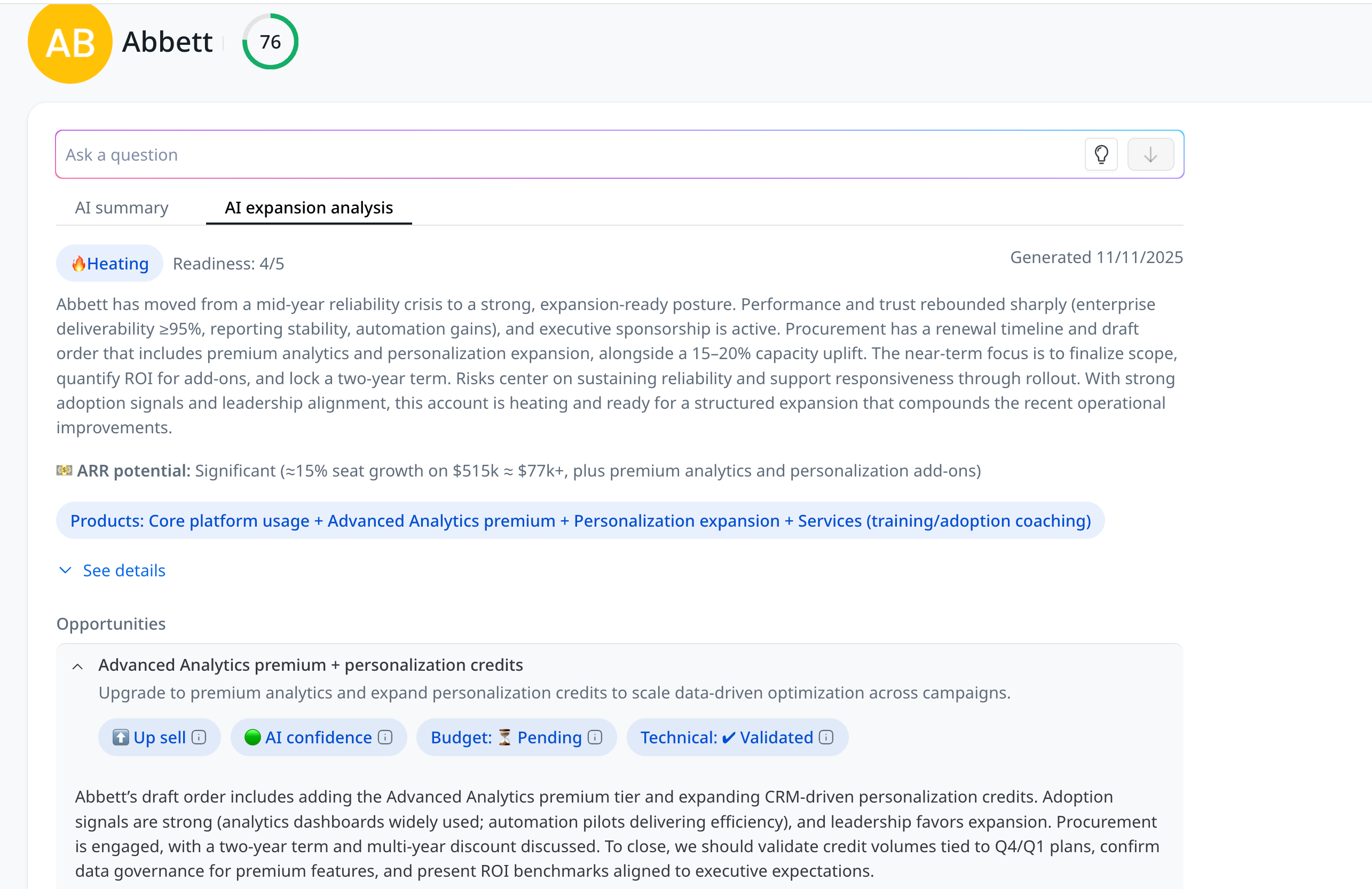
However, what you should do is build a foundational version first. Build your own basic sentiment detection. Connect it to your Zendesk tickets. Categorize customers as happy, frustrated, or at-risk. Get it working. Learn what good looks like.
Then when you’re ready to buy, you’ll know exactly what questions to ask. You’ll understand what “95% accuracy on risk detection” actually means. You’ll know if their expansion signals match what you’re seeing in your data. You’ll be a much more judicious buyer, ready to take full advantage of what a specialized platform offers.
This applies to any specialized solution: build the simple version. Learn by doing. Make sure your data is in order. Then level up with a platform that’s already done the hard work of specialization.
The Anti-Pattern
Here’s what fails: companies buy expensive AI platforms first. Then they discover their data isn’t ready, their team doesn’t know how to use the tool, and they don’t even know what “good” looks like. They can’t tell whether the platform is working, so it sits unused while everyone feels guilty about the wasted budget.
The winning pattern: Build scrappy first. Learn what you need and raise your bar. Buy specialized solutions once you know exactly what problem you’re solving and can evaluate whether the vendor actually solves it better than you can.
Don’t buy your way into this. Build your way in. Then buy smart.
Your 90-Day Action Plan
Here’s what you actually do when you get back to the office Monday morning.
Month 1: Foundation
Identify your three roles (Visionary, Context Master, Operator), even if part-time. Pick your lowest hanging fruit with the biggest impact. Set up free tools (N8N, Google AI Studio, choose your LLM). It takes a couple hours. Audit your documentation. Catalog what exists, but don’t fix anything yet.
Month 2: Build & Prove
Build your first automation with one feature only. Ticket classifier? Just classify sentiment: happy, pissed, neutral. Three categories. Test with 10% volume, measure accuracy. Deploy at 90%+ accuracy, iterate if not.
Month 3: Scale & Systematize
Build five more agents using lessons learned (this goes way faster now). Create your measurement system. Even a spreadsheet works. Present ROI to leadership: what you built, time saved, money not spent, what’s next.
90 days. 10 agents. Measurable ROI. That’s not a hope. That’s the playbook Colin followed, and you can too.
The Choice
A year from now, there are going to be two types of CS organizations. And the gap between them is going to be insurmountable.
The first type is still running perpetual pilots. They’ve been evaluating vendors for 18 months, waiting for perfect documentation before taking the first real step. They keep rerunning the same pilot, tweaking variables, writing reports, and holding meetings about meetings. Meanwhile, their team is burning out under manual work, and every week they lose ground to competitors who are actually building. Those AI licenses are still sitting unused.
The second type has built real AI infrastructure. They’re shipping new agents every week, learning by doing, getting reps in, and building muscle memory. Their documentation improves in parallel with the work. Not perfect, but better every week. Their team is becoming AI-native, thinking in terms of “What can we automate next?” instead of “Should we pilot AI?”
By this time next year, they’re going to have built capabilities and institutional knowledge that you can’t just buy or catch up to overnight. What takes them a week will take everyone else months. They’ll be unstoppable.
The difference between these two paths isn’t budget. It’s not team size. It’s not that one organization had better documentation or better resources or a more supportive CEO.
The difference is the willingness to start messy and learn fast.
One year from now, the teams building today will be in an entirely different league. Those still piloting simply won’t be able to close the gap.
So you have a choice to make. And you need to make it today, not someday.
Watch the Full Conversation with Colin
Want to hear the deeper story behind how Cloudbeds built 150+ agents, reorganized their CS Ops team, and unlocked a 150x ROI?
Watch the full [Un]Churned episode here:
If you found this valuable, you’ll want to stick around. On the [Un]Churned Substack, we share real, unpolished, inside-the-room stories from leaders who are building best-in-class AI for post-sales teams. What’s working, what’s breaking, and what they’d do differently if they were starting today.
— Josh
Want to connect with other CS leaders building agentic systems? Drop a comment below or reach out. I’d love to hear what you’re working on.
Special thanks to Colin Slade for sharing his playbook so openly. You can follow his journey, and get field-tested lessons and frameworks along the way, by subscribing to his newsletter. His willingness to teach while building is exactly the kind of leadership that moves the entire industry forward.
Some people asked what the business impact has been of these efforts, so we had a follow up conversation with Colin. Here is what he cited:
- 15–20% reduction in churn (only 2-4 months out of the entirety of these efforts so this is a bit of a directional swag)
- ~2x customer growth with no additional headcount
- Low-cost, high-leverage AI infrastructure
- Cultural shift from “automate tasks” to “redesign processes”
I also got questions around whether all 150 AI workflows are truly operational. The answer is YES. The vast majority of those workflows are in production or about to be.
Here's the link to download the full list of all 150 agents that Colin and his team have produced: https://www.gainsight.com/resource/cloudbeds-list-of-150-post-sales-ai-workflows/.
Download it and please let us know in the comments here which ones would be at the top of your most wanted list!